How to Optimize Your Webflow Site to Be Referenced by Artificial Intelligence (AI)

Search engines are no longer the only gateways between your website and your prospects.
Today, artificial intelligence systems such as ChatGPT, Gemini, and Perplexity analyze, cross-reference, and synthesize information from sources they consider reliable, well-structured, and relevant.
This significantly expands the scope of action: it is no longer just about optimizing for Google, but about making your content understandable, structured, and usable by AI systems.
If you want your website to be cited in AI-generated responses, you need to go beyond traditional SEO and adopt a broader approach focused on data, clarity, and credibility.
Optimization for artificial intelligence can be implemented on any website.
However, some platforms make this work considerably easier.
Webflow, thanks to its precise control over HTML, semantic structure, metadata, and custom scripts, allows these optimizations to be implemented in a clean and advanced way.
How do I make my Webflow content show up in AI-generated answers like ChatGPT and Perplexity?
To get your Webflow content cited by ChatGPT, Perplexity or Google AI Overviews: answer specific questions directly in the first sentence of each section, use a clean H1-H2-H3 hierarchy, add Schema.org structured data (FAQPage, Article), allow AI crawlers in your robots.txt, and publish specialized content backed by real expertise. The rest of this guide covers each step in detail.
1. Understanding the Difference Between SEO and AI Optimization
Traditional SEO aims to rank a page in Google.
AI-oriented optimization aims to become a reliable source that models can cite — and also a reference they can recommend when a user is searching for a service or solution.
AI systems no longer simply list links. They synthesize, compare, and suggest options. If your website is perceived as clear, structured, and credible, it can be mentioned as a resource — and also suggested as a relevant provider.
AI systems prioritize:
- Clear and direct answers
- Logical structure (consistent H1, H2, H3 hierarchy)
- Specialized and in-depth content
- Sources with real authority
- Pages that clearly describe services, expertise, and concrete case studies
A website that is overly marketing-driven, vague, or poorly structured has little chance of being referenced — and even less chance of being recommended as a solution.
2. Properly Structuring Heading Tags (Clear Hierarchy)
Heading hierarchy is critical for automated information extraction.
As in traditional SEO, structural logic must be rigorous — but here it becomes even more strategic.
Fundamental rules:
- Only one H1 per page
- H2 for main sections
- H3 for subsections
- No illogical jumps (e.g., H2 → H4)
AI models analyze structure before interpreting content. A clear hierarchy facilitates understanding, contextualization, and content reuse.
Beyond heading tags, this also requires:
- Clean and readable code
- Consistent semantic HTML (header, main, section, article, nav, footer…)
A poorly structured website, filled with generic divs without semantic logic or headings used purely for design, loses algorithmic readability — and therefore its potential to be cited or recommended by AI systems.
3. Adding Structured Data (Schema.org)
Artificial intelligence systems heavily rely on structured data to understand context, content type, and the nature of your activity.
The reference standard is Schema.org, used by search engines and interpreted by many AI models.
To be integrated in the <head> using JSON-LD: the main Schema.org entities that structure and contextualize your website.
Without structured data compliant with Schema.org, your website remains readable for humans but only partially interpretable for machines.
In an AI-driven environment, machine readability becomes a competitive advantage.
.webp)
If your site is built on Webflow, the platform now offers dedicated features for SEO and AEO (AI Engine Optimization), making it easier to integrate and manage structured elements:
https://webflow.com/updates/ai-seo-aeo
This simplifies the technical implementation and makes it easier to align your site with the evolving requirements of search engines and AI models.
4. Optimize Metadata
As in traditional SEO, metadata optimization remains essential.
AI systems analyze metadata to quickly understand the topic, context, and reliability of a page.
Meta title
- 55–60 characters
- Clear and specific
- Focused on a precise topic
Example:
Optimizing Your Website for AI: Complete 2026 Guide
The title must accurately reflect the actual content of the page. No vague promises, no excessive marketing language.
Meta description
- Informative summary
- Neutral and descriptive tone
- Contains the main keywords
- Consistent with the real content
It does not only influence click-through rate; it contributes to overall semantic understanding.
5. Create an llms.txt File
Still emerging, but strategic.
To be placed at the root of your site:
https://yourdomain.com/llms.txt
Contrary to what one might think, the llms.txt file does not function like a robots.txt file.
As explained in Webflow’s official documentation, it is closer to a sitemap specifically designed for language models.
The distinction matters:
- A sitemap helps search engines crawl your pages.
- An llms.txt file helps AI systems understand your content, summarize it more effectively, and identify relevant information when users ask questions.
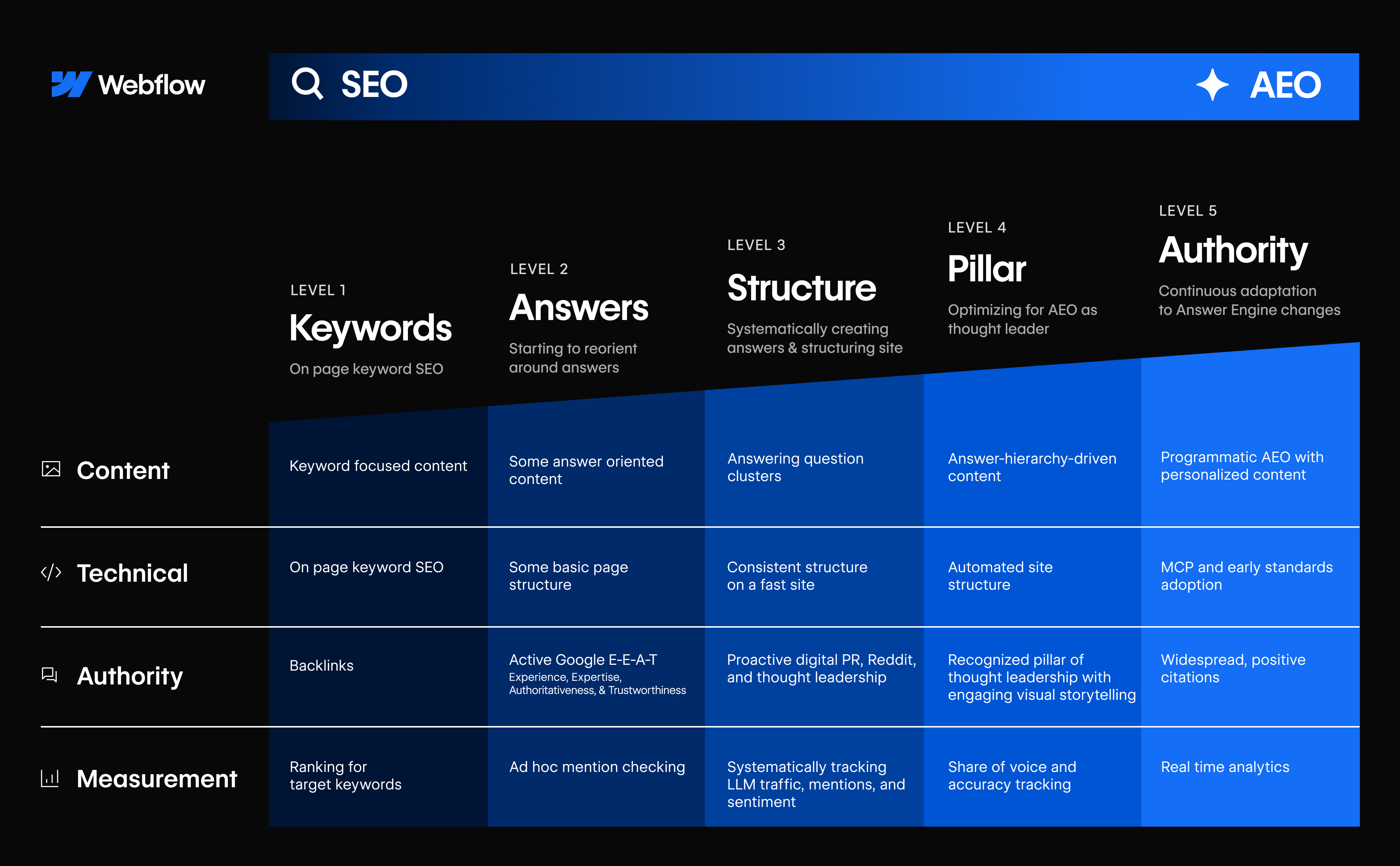
6. Produce Specialized Content
AI models prioritize content that delivers real informational value.
Not marketing talk. Not slogans. Substance.
This means producing:
- Precise technical guides
- Concrete analyses
- Detailed case studies
- Methodical explanations of specific problems
What works less effectively:
- Generic “Our Services” pages
- Vague text filled with promises
- Purely promotional content
The goal is not just to be visible, but to be useful.
Authentic, well-structured content grounded in real expertise has a much higher chance of being cited or recommended by AI systems.
7. Optimize Website Performance
A slow website is crawled less, indexed less, and therefore less usable for search engines — and by extension, for AI systems.
AI models rely in part on data derived from crawls conducted by engines such as Bing.
If your site is technically weak, it will be analyzed less effectively.
To evaluate performance, use:
https://pagespeed.web.dev/
Follow the tool’s recommendations carefully.
Key areas to monitor:
- Images optimized in WebP or AVIF
- Properly implemented lazy loading
- Minimal and intelligently loaded JavaScript
- Low CLS (Cumulative Layout Shift)
- Core Web Vitals within recommended standards
A fast website improves:
- Crawlability
- Indexation
- User experience
- Machine readability
Performance is not a minor technical detail.
It is a condition for visibility.
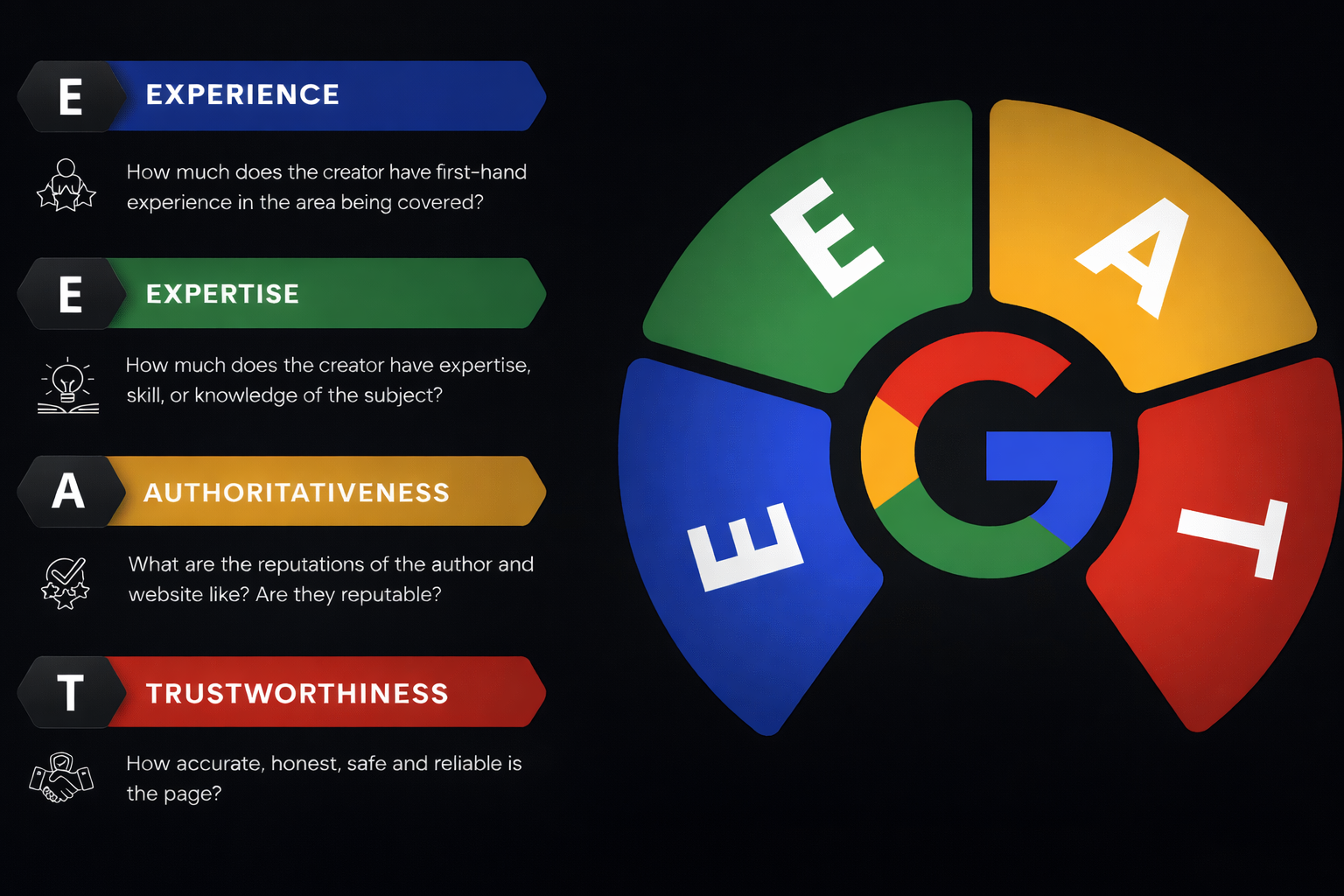
8. Work on Authority (E-E-A-T)
AI systems prioritize credible sources.
Concrete actions:
- Backlinks from recognized websites
- Guest publications
- Detailed case studies
- A complete author page
- Consistent presence across multiple platforms
Your expertise must be visible beyond your own website.
Conclusion
Being referenced by artificial intelligence systems is not a matter of luck.
It relies on:
- A clean technical structure
- Comprehensive structured data
- Specialized content
- Real authority
- Regular updates
SEO brings traffic.
AI optimization turns your website into a cited source.
If your goal is to be recognized as an expert in your field, structure and precision matter more than volume.
Need a Webflow expert freelancer to structure, optimize, and align your website with these new AI requirements?
Let’s audit your Webflow site and identify the priority optimizations.
FAQ
What is AEO (Answer Engine Optimization) for a Webflow site?
AEO, or Answer Engine Optimization, refers to the set of techniques that make a website easily usable by artificial intelligences such as ChatGPT, Gemini or Perplexity. Unlike traditional SEO targeting search engines, AEO optimises content so it can be understood, structured and cited by AI systems. On Webflow, this means using clear semantic structure, proper heading tags, Schema.org structured data and well-organised factual content.
Why should a Webflow site be optimised for AI in 2025?
Users are increasingly trusting AI-generated answers over traditional Google search results. If your site isn't structured to be understood and cited by these systems, you're missing out on growing visibility. AI optimisation is no longer optional for businesses that want to stay visible: it's a natural extension of traditional SEO, with different but complementary criteria.
What structured data should be added to a Webflow site for AI?
JSON-LD structured data using Schema.org is the most effective format for AI systems. For a services site, the most useful types are LocalBusiness, Service, FAQPage, BreadcrumbList and Article. On Webflow, these are added via HTML embed blocks or through the CMS for dynamic pages. They help AI systems (and Google) understand the type of content, its author, publication date, and geographic and topical relevance.
Can a Webflow blog's content be picked up by ChatGPT or Perplexity?
Yes, if the content is publicly accessible, well structured and of sufficient quality. AI tools like Perplexity or recent versions of ChatGPT (with web access) index and cite reliable sources in their responses. To maximise your chances of being cited, your content should answer specific questions, use structured headings (H2, H3), include factual data and avoid generic filler content.
Does the robots.txt file affect a Webflow site's visibility to AI?
Yes, indirectly. Some AI crawlers respect the robots.txt file, notably GPTBot (OpenAI) and Google-Extended (Google Gemini). If these bots are blocked in your robots.txt, your content won't be included in their training or indexing data. On Webflow, the robots.txt file is accessible and editable via the site's SEO settings. It's recommended not to block these crawlers if you want maximum visibility in AI-generated responses.