Webflow Pricing Explained: A Clear Guide for 2026

Before jumping into the details, it's important to understand that Webflow's pricing is built around three separate components, each serving a different purpose.
1. Site Plans
Site Plans are what you pay for to publish a website on a custom domain using Webflow's hosting.
Two big families exist:
- Standard sites (marketing, blogs, portfolios…)
- eCommerce sites (online stores)
Your price depends mainly on:
- the amount of content you plan to publish,
- traffic and bandwidth,
- whether you need the CMS (Webflow's dynamic content system),
- whether you sell products online.
2. Add-ons
These are optional upgrades that expand Webflow's capabilities. They include tools for:
- multilingual sites (Localization),
- analytics (Analyze),
- A/B testing and personalization (Optimize).
You can activate them only if you need them, they are not included in standard plans.
3. Workspaces
Workspaces unlock collaboration features inside your Webflow account. They do not allow you to publish a site on a custom domain : that's what Site Plans are for.
Workspaces are ideal for agencies, teams, and freelancers working with clients. They let multiple people work together on the same project with role-based permissions.
Site Plans (for standard, non-eCommerce sites)
These plans are designed for marketing websites, blogs, portfolios, and any project that doesn't involve selling products online.
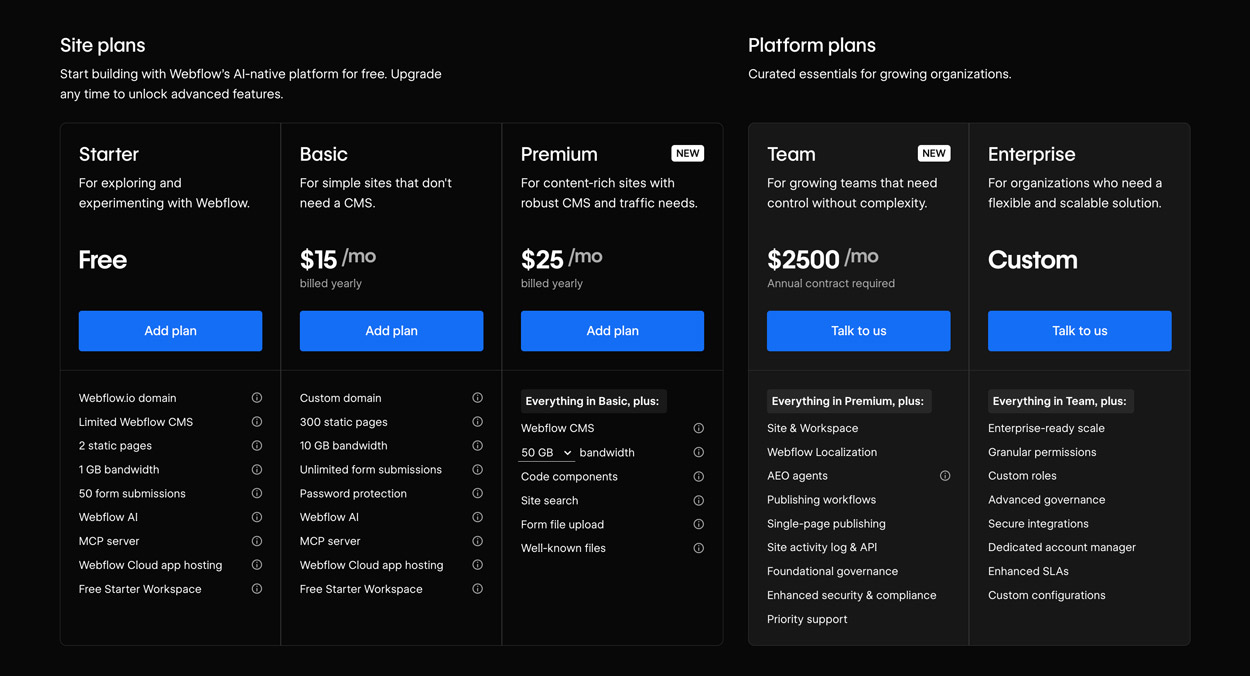
May 2026 update: Webflow has simplified its pricing structure. The former CMS and Business plans have merged into a single Premium plan, and a new Team plan bridges the gap between self-serve and Enterprise.
⭐ Starter: Free
Best for exploring and experimenting with Webflow.
You can create and publish a small site, but:
- it uses a webflow.io domain,
- CMS is heavily limited,
- only 2 static pages,
- 1 GB bandwidth,
- 50 form submissions,
- Webflow AI and MCP server access included.
Useful for experimenting, not for launching a real business website.
Basic: $15/month (yearly)
For simple sites that don't need a CMS.
- Custom domain
- 300 static pages
- 10 GB bandwidth
- Unlimited form submissions
- Password protection
- Webflow AI + MCP server included
Ideal for landing pages, small static sites, and MVPs. Not recommended if you plan to publish content regularly.
Premium: $25/month (yearly) ✦ NEW
The new central plan, replacing and unifying the former CMS and Business plans.
Everything in Basic, plus:
- Full Webflow CMS
- 50 GB bandwidth (expandable via add-on)
- Code components
- Site search
- Form file upload
- Well-known files
Premium is the right choice for the vast majority of professional sites: blogs, portfolios, marketing sites with dynamic content. Former CMS and Business subscribers naturally migrate to this plan.
Team: $2,500/month (annual contract) ✦ NEW
The new intermediate tier between self-serve and Enterprise, designed for growing teams that need control without the complexity of a full Enterprise setup.
Everything in Premium, plus:
- Site & Workspace unified
- Webflow Localization included
- AEO agents
- Publishing workflows
- Single-page publishing
- Site activity log & API
- Foundational governance
- Enhanced security & compliance
- Priority support
Requires an annual contract. Pricing is discussed directly with Webflow.
Enterprise: Custom Quote
Tailored for very large organisations.
Everything in Team, plus:
- Enterprise-ready scale
- Granular permissions
- Custom roles
- Advanced governance
- Secure integrations
- Dedicated account manager
- Enhanced SLAs
- Custom configurations
Pricing is negotiated directly with Webflow.
Site Plans (for eCommerce)
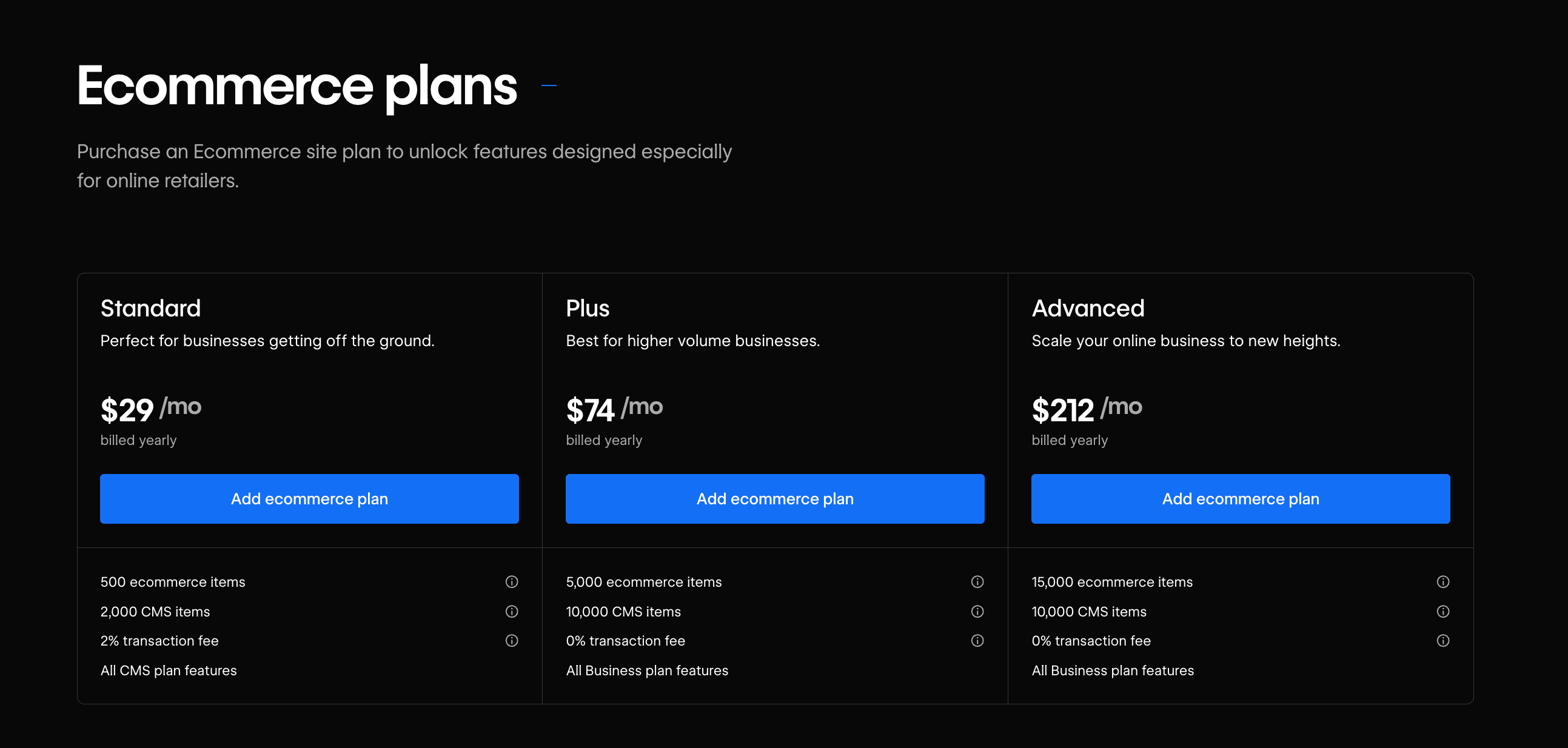
Webflow offers three plans for online stores, ranging from small shops to complex eCommerce catalogs.
All include:
- Stripe, PayPal, Apple Pay
- Automated transactional emails
- Product categories
- Tax calculation
- Full CMS access
Standard: $29/month
Good for beginners or small product catalogs.
- 500 eCommerce items
- 2% transaction fee
- All CMS Plan features included
Plus: $74/month
Designed for growing stores.
- 5,000 eCommerce items
- 0% transaction fees
- Includes all Business Plan features
Recommended for stores generating up to $200k/year.
Advanced: $212/month
Best for large online shops.
- 15,000 eCommerce items
- 0% transaction fee
- All Business features included
This is the maximum tier, no higher eCommerce plan exists.
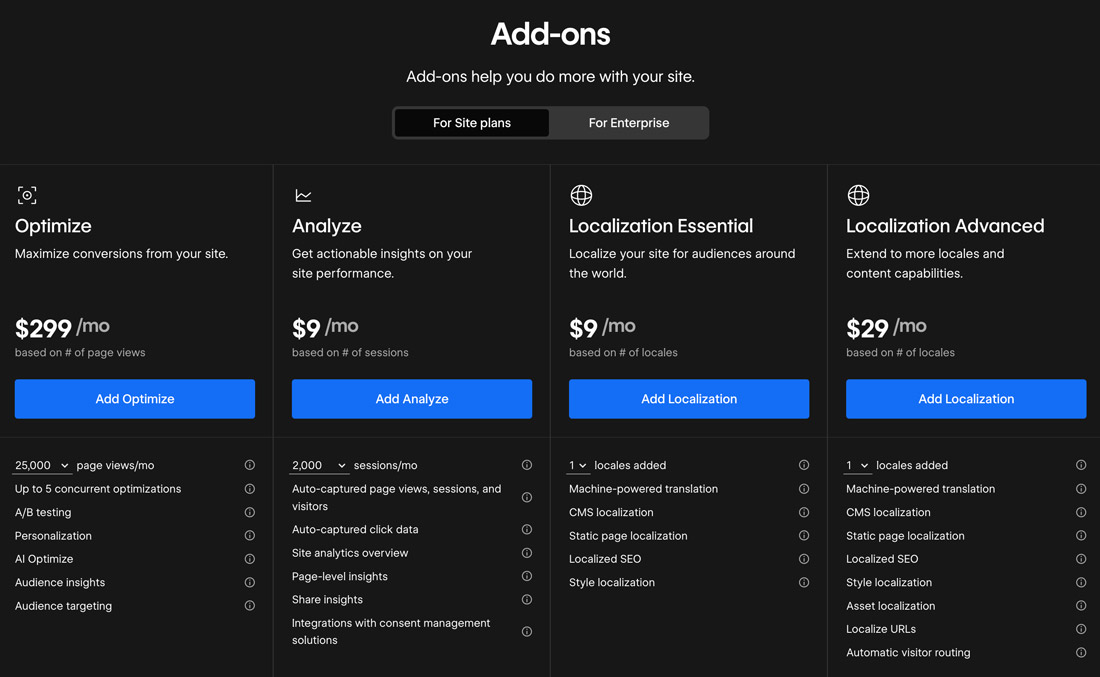
Add-ons
On top of the core plans, Webflow offers four optional add-ons to extend your site's capabilities:
Optimize: $299/month
Based on number of page views. To maximize conversions. Includes: A/B testing, personalization, AI Optimize, audience insights and targeting. Up to 5 concurrent optimizations.
Analyze: $9/month
Starting at 2,000 sessions/month. To analyze visitor behavior without a third-party tool. Includes: auto-captured page views, sessions and click data, site analytics overview, page-level insights, share insights, and consent management integrations.
Localization Essential: $9/month
Per locale added. To localize your site for international audiences. Includes: machine-powered translation, CMS localization, static page localization, localized SEO and style localization.
Localization Advanced: $29/month
Per locale added. For extended localization capabilities. Includes everything in Essential, plus: asset localization, localized URLs and automatic visitor routing.
These add-ons are independent from your chosen plan and can be activated at any time based on your needs.
How to Know Which Webflow Plan You Need
Ask yourself the following:
✔ Do you want a custom domain?
→ Then you need a paid Site Plan.
✔ Do you need to manage dynamic content (blog, portfolio, etc.)?
→ Choose the Premium plan.
✔ Do you need eCommerce?
→ Pick one of the three eCommerce plans.
✔ Will you collaborate with others?
→ This affects your Workspace and seats.
✔ Do you need multiple languages?
→ Add Localization, or opt for the Team plan which includes it.
If you're still unsure, I can help you assess your needs based on traffic, CMS usage, SEO goals, and site structure.
I didn't include the detailed pricing for eCommerce plans or Workspaces in this article, but you can find the full breakdown directly on Webflow's official pricing page: https://webflow.com/pricing
If you'd like help choosing the right Webflow plan for your project, feel free to reach out directly through my contact page — I'll be happy to guide you.
FAQ
How much does a Webflow subscription cost in 2026?
As of May 2026, Webflow has simplified its plans. For standard sites, three self-serve options are available: Starter (free), Basic ($15/month), and Premium ($25/month). The Premium plan replaces the former CMS and Business plans in a single unified tier. For teams, the new Team plan is available at $2,500/month, and Enterprise remains on custom quote. All prices apply when billed annually.
What's the difference between a Webflow Site plan and a Workspace plan?
Site plans cover the publishing and hosting of a specific site: they define bandwidth limits, the number of CMS items, and access to eCommerce features. Workspace plans cover access to the Webflow working environment for designers and developers: they define how many sites you can manage, collaboration with other team members, and access to advanced features. For end clients, the Site plan is what matters most.
What changes for former CMS and Business plan users?
The CMS and Business plans no longer exist as separate tiers. They have merged into the new Premium plan at $25/month. Former CMS users will see a slight price increase, but will benefit from significantly higher CMS limits. Former Business users will see a price decrease, with the same features and more.
Is the Webflow Basic plan enough for a professional brochure site?
The Basic plan works if your site doesn't need a dynamic CMS and your monthly traffic is moderate. It lets you publish on a custom domain and includes the core features. However, if you want to manage blog posts, portfolio projects or any content that gets updated regularly via the CMS, you'll need to upgrade to the Premium plan.
Is Webflow hosting worth the price compared to a standard WordPress host?
Webflow hosting is all-in-one: it includes a global CDN, automatic HTTPS, security updates, backups and support. An equivalent-quality WordPress hosting setup (managed VPS + CDN + security) often comes to a similar or even higher total cost once all plugins and additional services are factored in. For an SME that wants to focus on its business rather than managing technical infrastructure, Webflow usually offers the best value for money.